Making a petabyte-scale warehouse feel simple
BigQuery gives analysts and engineers access to enormous datasets — but that power came with a learning curve steep enough to keep first-time users out. This project rethought the query and exploration experience so both a first-day analyst and a ten-year data engineer could find their footing.
Try it live — BigQuery Studio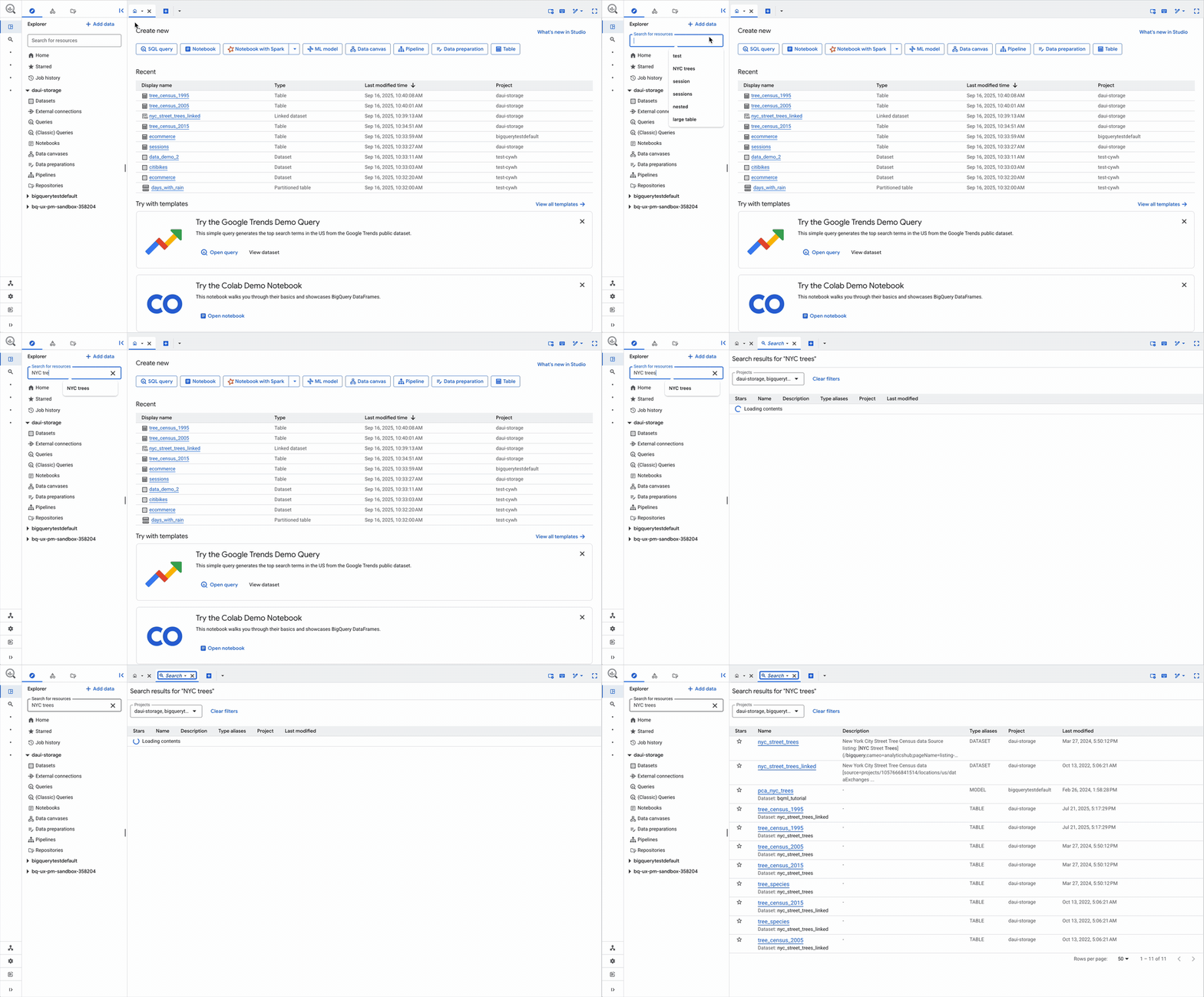
Overview
BigQuery is Google Cloud's serverless data warehouse, used by everyone from solo analysts to enterprise data platform teams. As adoption grew beyond core data engineers, the console's query and exploration surfaces increasingly had to serve two very different mental models at once — without slowing down the power users who lived in it every day.
This project modernized the core BigQuery Studio working environment — how people find data, write queries against it, and manage the workspace around that work. The refreshed console experience launched publicly in October 2025, spanning connected workstreams across resource exploration, an in-context reference panel, predictable tab behavior, a dedicated job history surface, and a workspace that gets out of the way.
Problem
Analysts, engineers and data scientists were losing time to the environment rather than the analysis. Finding the right table among thousands meant slow, repetitive navigation; writing a query against an unfamiliar schema meant bouncing between the editor and table details — or running throwaway queries just to see column names. Every opened resource spawned another tab, and the workspace filled with UI competing for attention.
- Resource discovery didn't scale: navigating to frequently used tables and queries across projects was slow and repetitive
- Writing complex queries forced constant context-switching to check schemas, column names and table details
- Tabs proliferated uncontrollably — and sometimes content was replaced when users didn't expect it
- Job history lived in a bottom panel that added clutter while offering limited visibility
Process
I partnered closely with engineering and data platform PMs to map the query lifecycle end to end — from schema discovery through writing, running, and debugging a query — and identified where each user type dropped off. The work resolved into a set of connected workstreams, each attacking a distinct source of friction.
Finding Data: the Explorer
The redesigned Explorer shows richer detail for every resource and lets users filter by project and resource type, keep starred resources from every project one tab away, and run full-text search across all BigQuery resources in the organization. The classic Explorer stayed available alongside it, so long-tenured users could switch on their own schedule rather than ours.
Writing Queries: the Reference Panel
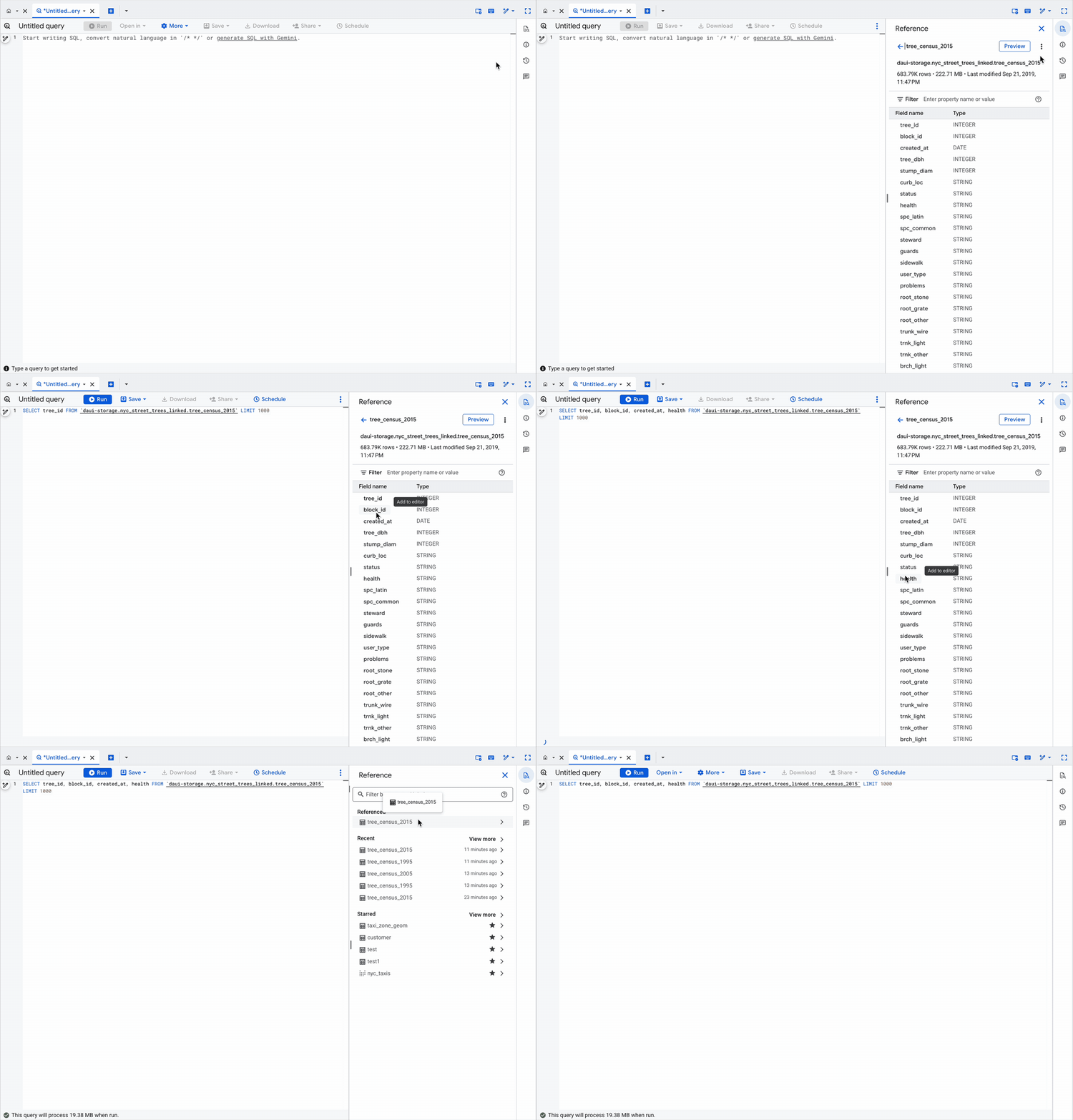
Instead of forcing a round-trip to check a schema, a context-aware reference panel surfaces table and schema details right beside the editor while the user types. Clicking a field name drops it into the query; an insert-snippet action scaffolds SQL against a table directly. The throwaway "what are the columns called?" query stopped being part of the workflow.
A Workspace That Behaves
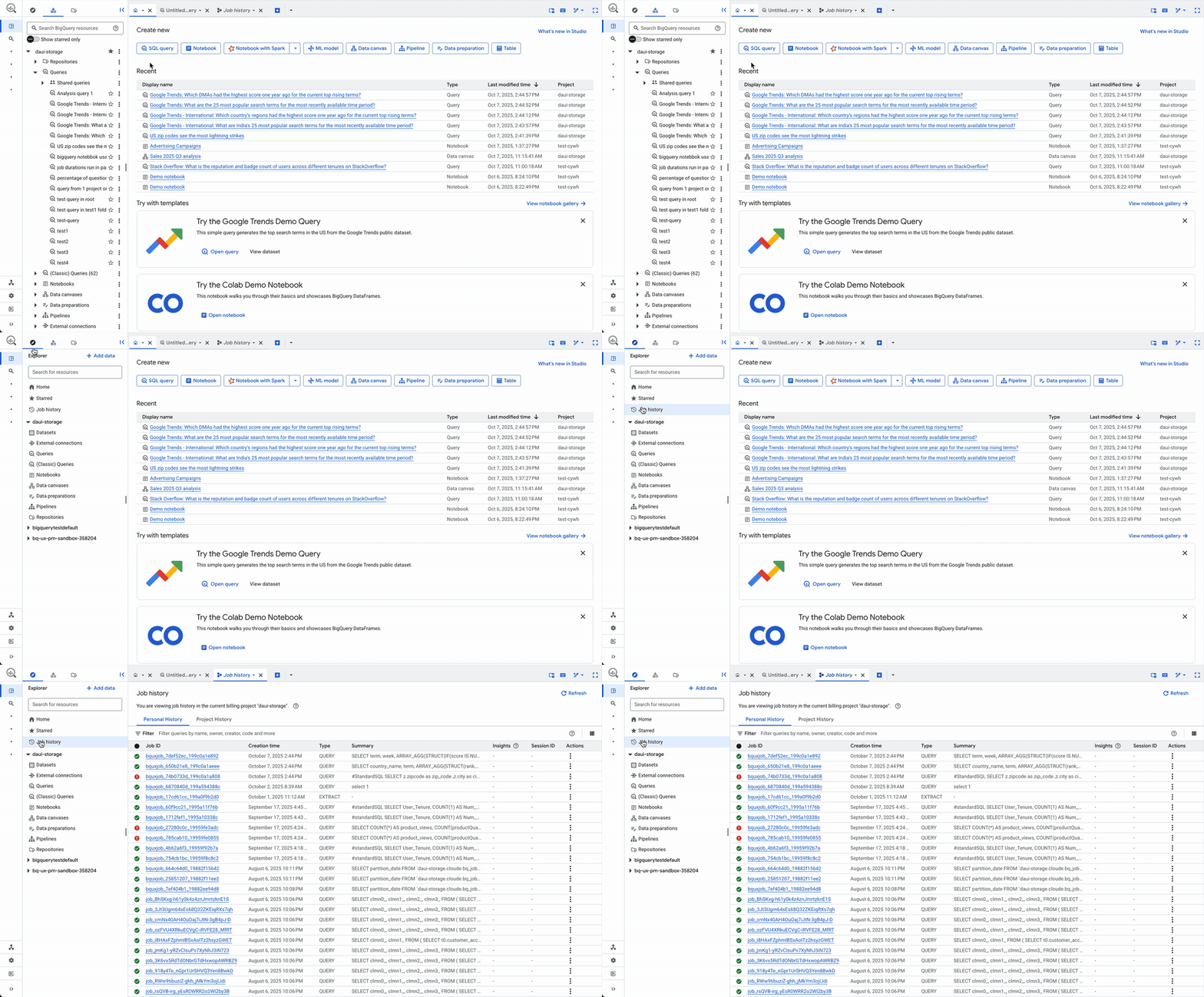
Tab behavior was standardized around a single predictable default — resources open in the current tab — with deliberate overrides: Ctrl/Cmd-click opens a new tab, and double-clicking a tab locks it against replacement, with a clear visual state change. Job history moved out of the bottom panel into its own dedicated tab off the Explorer, and the Explorer itself became fully collapsible for a focused, editor-first view.
Outcome
The refreshed BigQuery Studio interface launched publicly in October 2025 and is live for all users in the Google Cloud console, with in-product guidance introducing the changes from the Studio Home tab. Together, those workstreams cut the navigation, context-switching and workspace-management overhead that sat between users and their actual analysis.
- Org-wide resource search and starring replaced slow, repetitive navigation to frequently used tables and queries
- In-context schema reference eliminated exploratory queries and copy-pasting of table and column names
- Predictable tab defaults with explicit overrides ended accidental content replacement and tab sprawl
Learnings
A console this mature doesn't hand you a problem statement. It hands you symptoms — scattered feature requests, complaints that contradict each other, usage data that tells you where people stop but never why. Most of my early effort went into converting that noise into a shape the team could act on: mapping the query lifecycle end to end, finding where each type of user actually dropped off, and resolving what I found into distinct workstreams, each attacking its own source of friction. Framing the problem well turned out to be most of the work — once those workstreams had names, decisions that had been circulating for months resolved quickly, because people were finally arguing about the same thing.
Complexity here isn't something to remove; a petabyte-scale warehouse is genuinely complicated and its power users depend on that. "Simple" and "powerful" aren't opposites — they're resolved by sequencing. The harder judgment was holding the shape of the whole system, defaults, progressive disclosure and escalation paths together, so that a first-day analyst and a ten-year data engineer could each find their footing in the same interface, and so that changes shipping from different teams landed as one coherent experience rather than a set of good ideas colliding.
That coherence was mostly an alignment problem. Each workstream had its own engineers, its own PM, and its own reasons for wanting something slightly different — and none of them reported to me. What moved things forward wasn't arguing case by case but giving everyone a shared reference: an articulated principle, reveal complexity when the user is ready for it, and the patterns and defaults that made it concrete. Preserving the classic Explorer alongside the new one came out of the same instinct — meeting long-tenured users, and the teams advocating for them, where they were instead of forcing a migration on our schedule.
What I'd carry forward: at this scale, the decisions that survive are the ones the organization can repeat without you in the room. Encoding the principle into patterns gave a dozen adjacent teams a way to make consistent calls long after the project shipped — which matters more than any single screen I drew.