Amazon Lex
Amazon Lex is a fully managed artificial intelligence service that leverages natural language understanding (NLU) and automated speech recognition (ASR) to empower chatbot developers and designers to build chatbots that interact with people through audio, text and DTMF — and can be deployed across different channels.
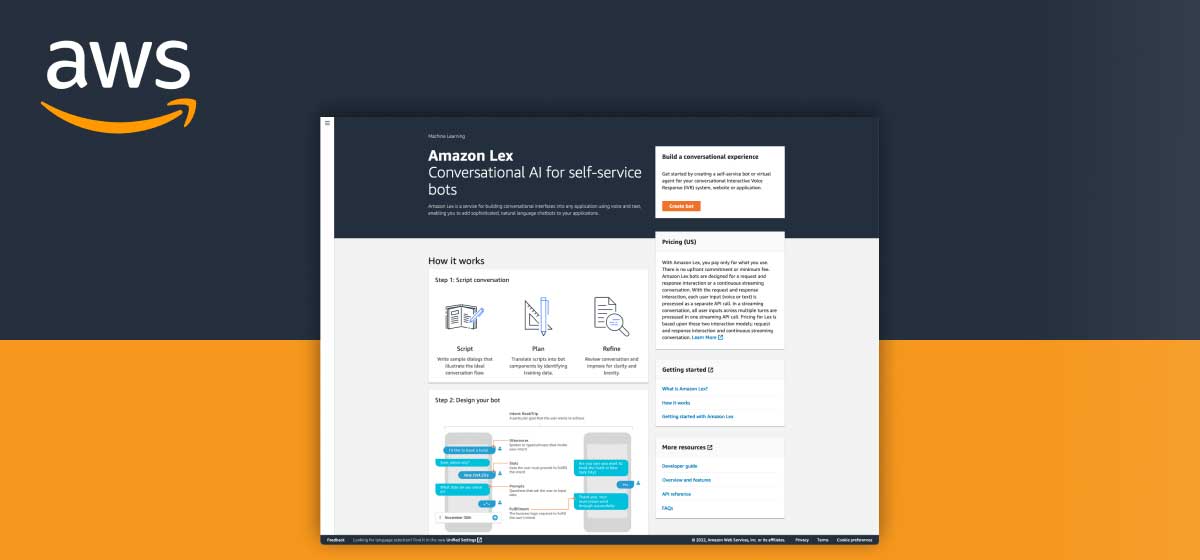
Service Introduction

What is Amazon Lex?
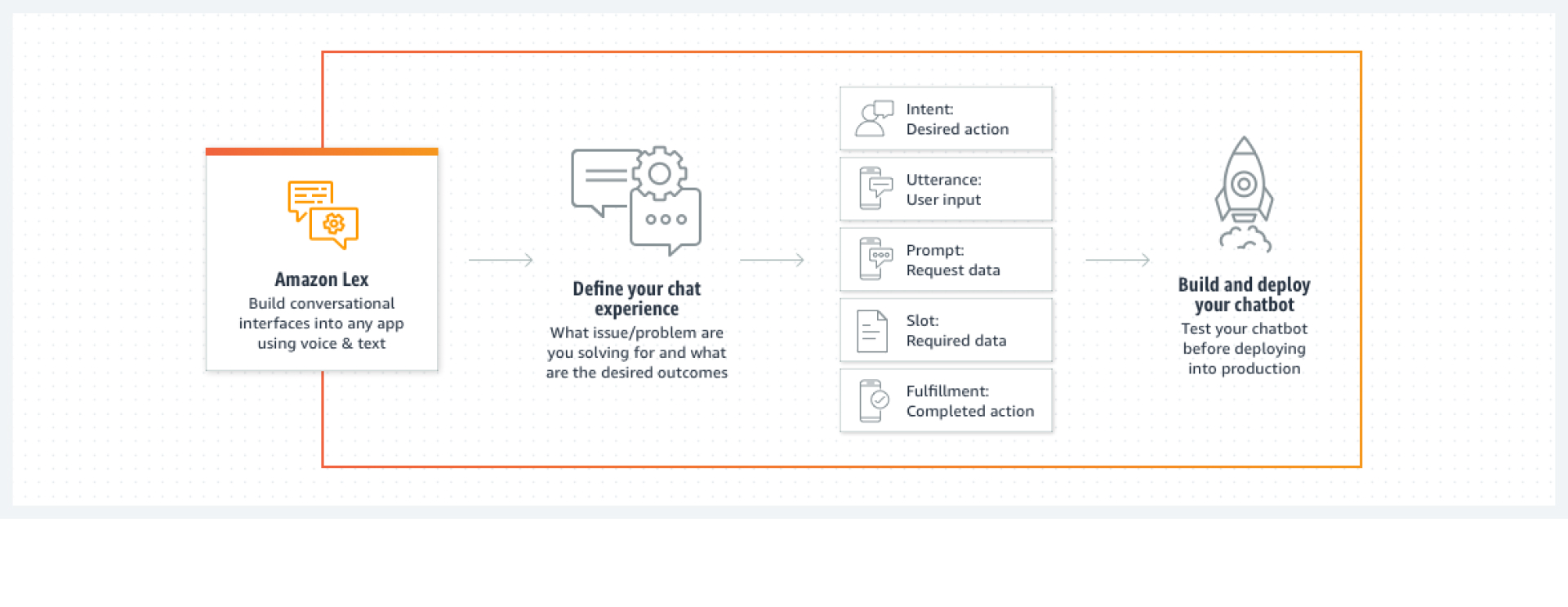
With Amazon Lex, builders define their chat experience — the intents (desired actions), utterances (user inputs), prompts (data requests), slots (required data) and fulfillment — then build, test and deploy chatbots into production across channels, using voice and text.
Though Amazon Lex is an older service launched in 2016, it had long focused on API and SDK development to empower chatbot developers. With the launch of the Amazon Lex V2 console in 2021, the team began investing more in the console user experience — providing tools to empower chatbot designers and business owners with less engineering knowledge.
I joined the team in January 2022 as UX lead, to help deliver urgent design work and set up a foundation for the future development of the Amazon Lex UX team. This case study covers how I overcame various challenges as a UX lead, followed by two design work examples: improvement work on the Automated Chatbot Designer, and the Visual Builder — a new way to design conversations in Lex.
Challenges & What I Did
Complex Team Structure
- 4 product managers focusing on different, interconnected features — with one outgoing and one incoming product lead
- 150+ engineers and data scientists under different engineering managers, with sub-teams for different aspects of the service
- Onboarding and training 2 new junior UX designers across services
- Personnel changes in the documentation/UI writing team, with 2 new writers
Scattered Information
- Only 2 previous UX research reports could be found; no consolidated documentation of project details and past decisions
- No foundational UX documentation such as service personas or journey maps
- Customer feedback on existing features scattered across engineering logs, customer call notes and work tickets
Urgent Needs & a Tight Timeline
- A four-month backlog of UX work across 5 projects in different stages — all needing completion in just two months
- An ambitious 2022/23 roadmap of new features spanning console experience, science and engineering optimization
Challenges are also opportunities to learn and develop skills. To overcome them, I took action from three angles: learn and document, plan and prioritize, execute and deliver.
What I Did — and the Results
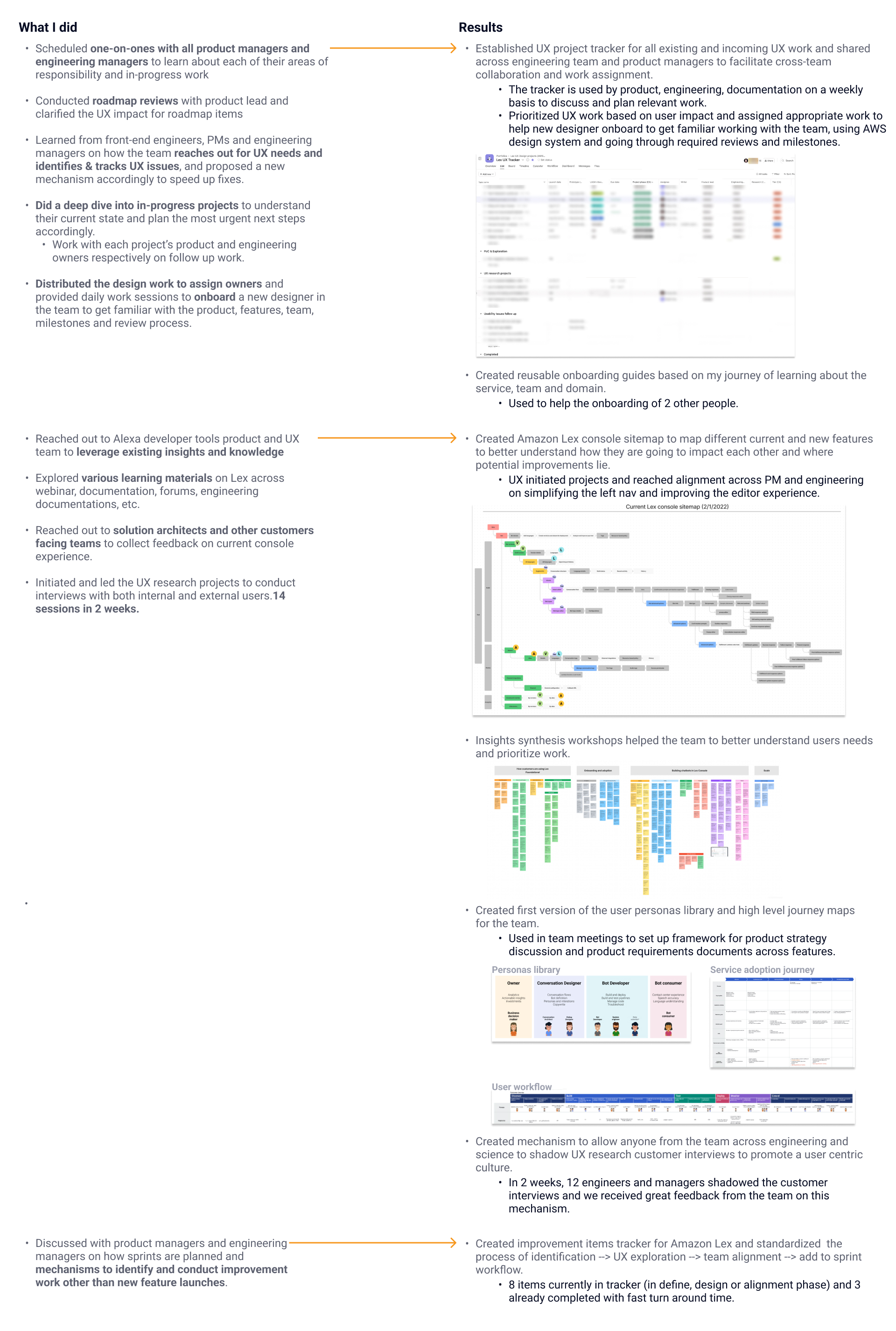
- Scheduled one-on-ones with all product managers and engineering managers to learn their areas of responsibility and in-progress work; conducted roadmap reviews with the product lead and clarified the UX impact of roadmap items
- Learned how the team reaches out for UX needs and identifies and tracks UX issues, and proposed a new mechanism to speed up fixes
- Did a deep dive into in-progress projects to understand their current state and plan the most urgent next steps with each project's product and engineering owners
- Distributed design work to assigned owners and ran daily work sessions to onboard a new designer on the product, features, milestones and review process
- Reached out to the Alexa developer tools product and UX team to leverage existing insights; explored learning materials across webinars, docs, forums and engineering documentation; collected console feedback from solution architects and other customer-facing teams
- Initiated and led UX research with both internal and external users — 14 interview sessions in 2 weeks
The results:
- A UX project tracker for all existing and incoming UX work, shared with engineering and product — used weekly to discuss and plan work, prioritize by user impact, and help the new designer onboard through the AWS design system, reviews and milestones
- Reusable onboarding guides based on my own journey of learning the service, team and domain — used to onboard 2 other people
- An Amazon Lex console sitemap mapping current and new features to see how they impact each other and where potential improvements lie — UX-initiated projects reached alignment across PM and engineering on simplifying the left nav and improving the editor experience
- Insights synthesis workshops that helped the team better understand user needs and prioritize work
- The first personas library and high-level journey maps for the team — used in team meetings to frame product strategy discussions and product requirements documents across features
- An interview shadowing mechanism letting anyone across engineering and science shadow UX research calls to promote a user-centric culture — in 2 weeks, 12 engineers and managers shadowed customer interviews, with great feedback from the team
- An improvement items tracker with a standardized process — identification → UX exploration → team alignment → sprint workflow — with 8 items in the tracker and 3 already completed with fast turnaround
Design Work Example 1 — Automated Chatbot Designer
The first example is a feature I inherited in preview and led to general availability — a backlog of customer feedback turned into a redesign of every step in its main workflow.
Amazon Lex Automated Chatbot Designer
Conversation design is the slowest part of building a chatbot. Traditionally a team of business analysts reads through thousands of lines of agent–customer transcripts to find the intents that come up most often, disambiguate the ones that overlap — a home claim versus an auto claim — and compile the valid values for every piece of information an intent needs in order to be fulfilled. It takes weeks, it's error-prone, and a missed intent becomes a chatbot that can't answer the question.
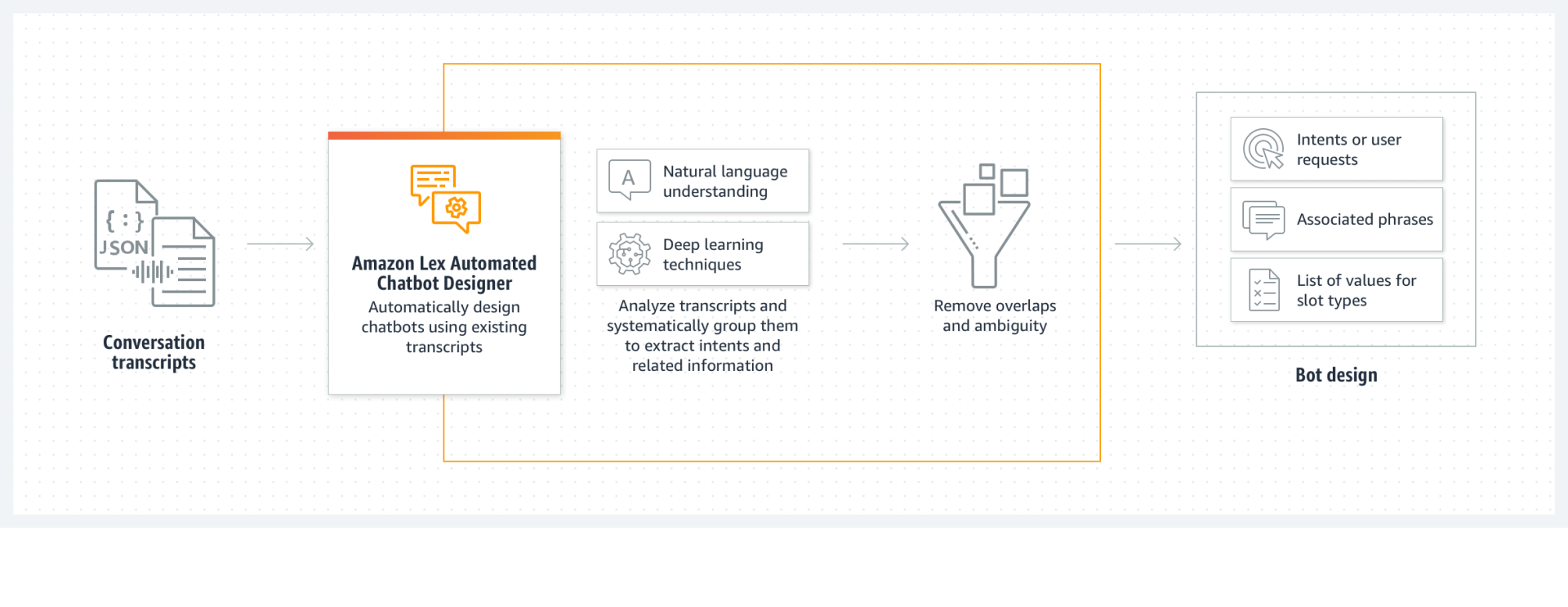
The Automated Chatbot Designer replaces that first pass with machine learning. Users point Amazon Lex at transcripts of real calls from their contact center; it semantically clusters those conversations around the most common intents, removes the overlaps between them, and returns an initial bot design — intents, the sample utterances that reveal them, and the slots needed to fulfill them — at roughly 600 lines of transcript per minute. Design work that took weeks starts in hours.

It launched in preview on December 1, 2021, six weeks before I joined, and customer feedback was arriving faster than it was being resolved. Preview is the moment a feature is judged: the mechanics worked, but nothing about the experience was settled, and general availability meant customers would put it in front of their own production bots.
So I worked closely with the product manager and engineering teams to consolidate scattered feedback into one clear picture of the problems, then explored solutions across all four steps of the main workflow — upload transcripts, wait for processing, review and select the discovered intents and slot types, and add them to the bot. The four sections below are that work, step by step. The feature reached general availability in June 2022.
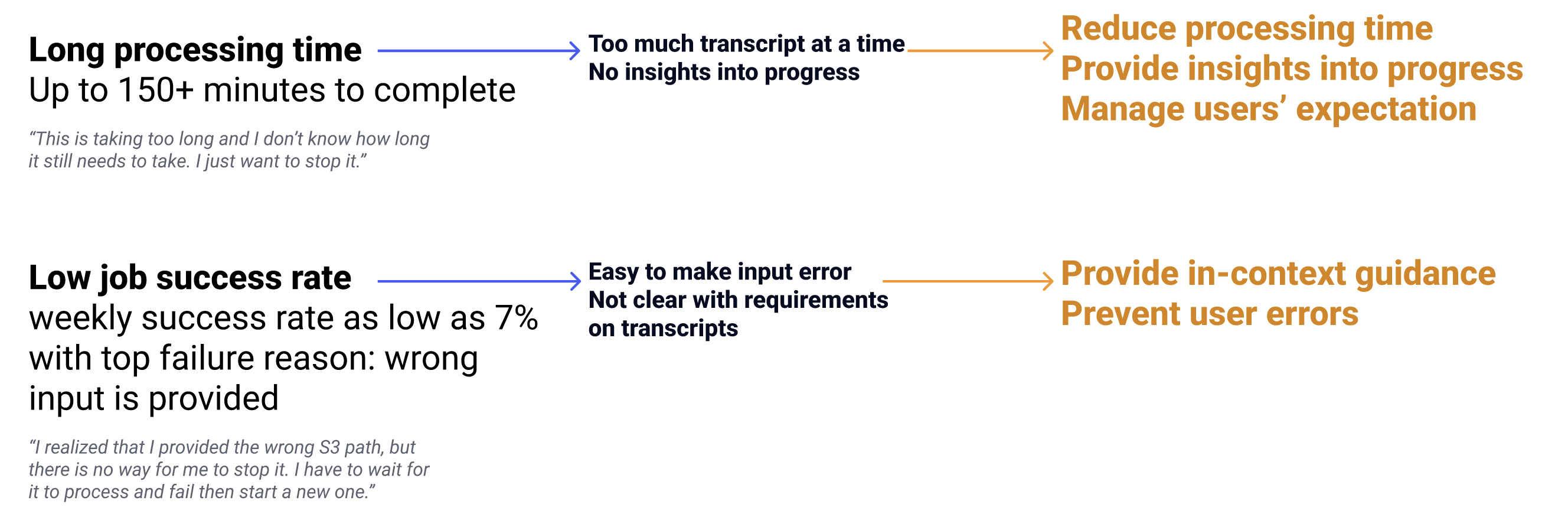
Two problems dominated the feedback, and tracing each from symptom to cause gave the redesign its goals: processing that ran up to 150+ minutes with no visibility into how far along it was, and a weekly job success rate as low as 7%, where the top failure reason was simply that the wrong input had been provided.
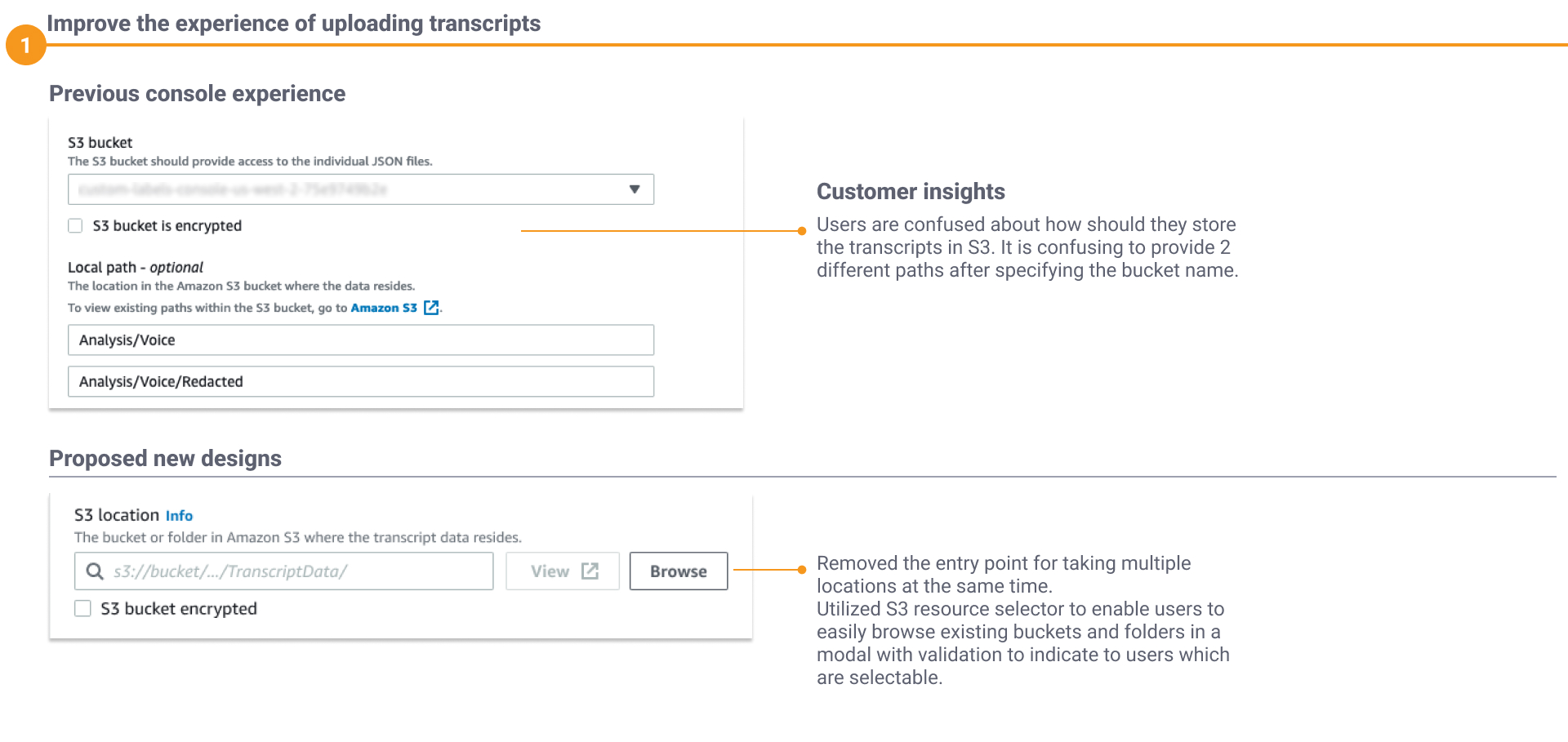
1 — Uploading Transcripts
Getting started means pointing Lex at your data — an S3 bucket holding the transcripts, a KMS key for access, and a date range to filter what gets analyzed. The bucket was where users got stuck: after specifying a bucket name the console offered two different paths for locating the files, and it wasn't clear which one to use. The new design removed the entry point for multiple locations and used the S3 resource selector instead, letting users browse existing buckets and folders in a modal with validation indicating which are selectable.
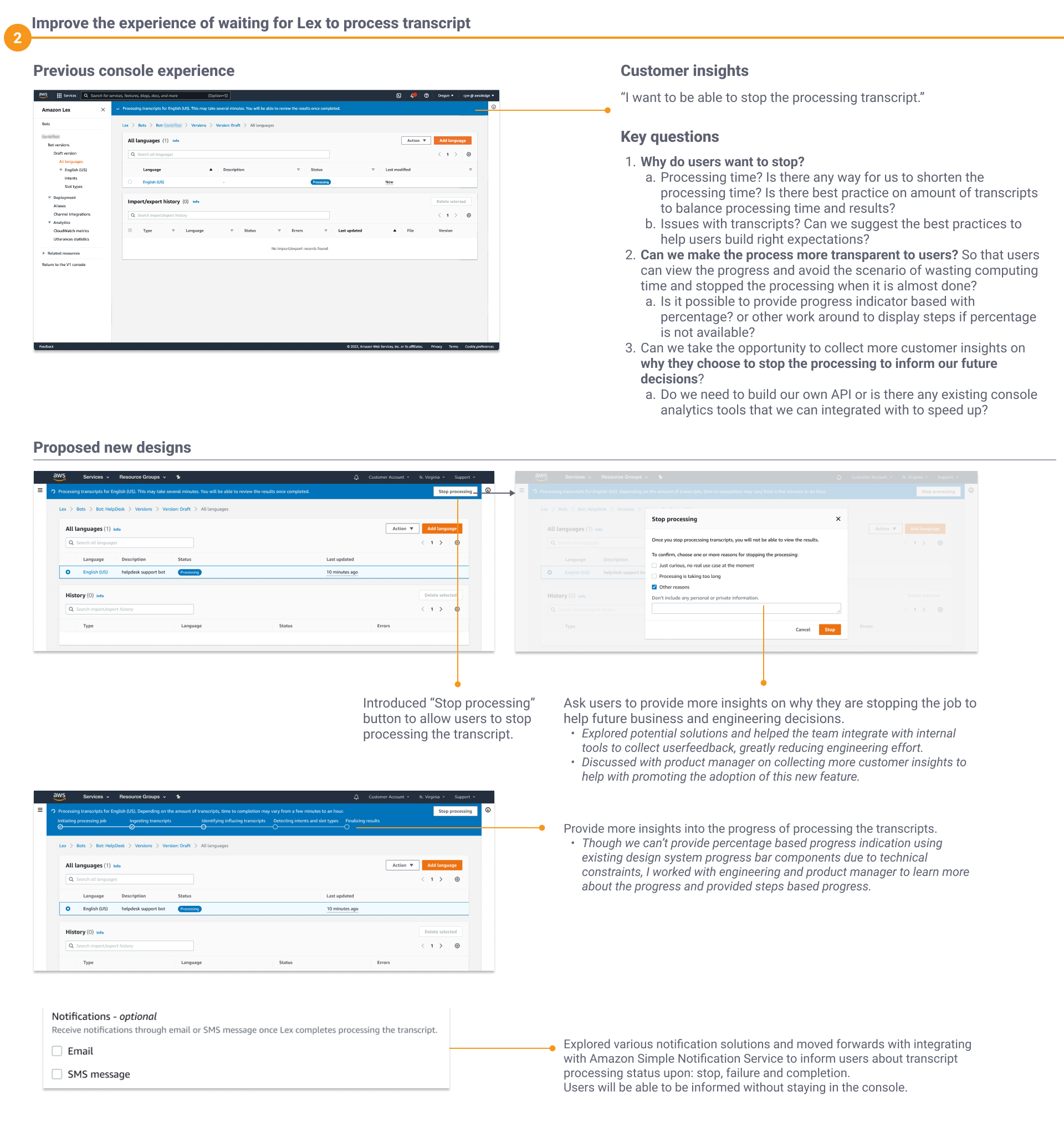
2 — Waiting for Processing
Customers told us: "I want to be able to stop the processing transcript." That raised key questions — why do users want to stop? Can we make the process more transparent so users don't waste computing time by stopping a job that's almost done? And can we use the moment to collect insights on why they stop, to inform future decisions?
- Introduced a Stop processing action, with a dialog that asks users why they're stopping — and helped the team integrate with internal tools to collect that feedback, greatly reducing engineering effort
- Provided steps-based progress into transcript processing — percentage-based progress wasn't feasible within technical constraints, so I worked with engineering and the PM to surface the actual processing stages instead
- Integrated with Amazon Simple Notification Service so users are informed by email or SMS when processing stops, fails or completes — no need to stay in the console
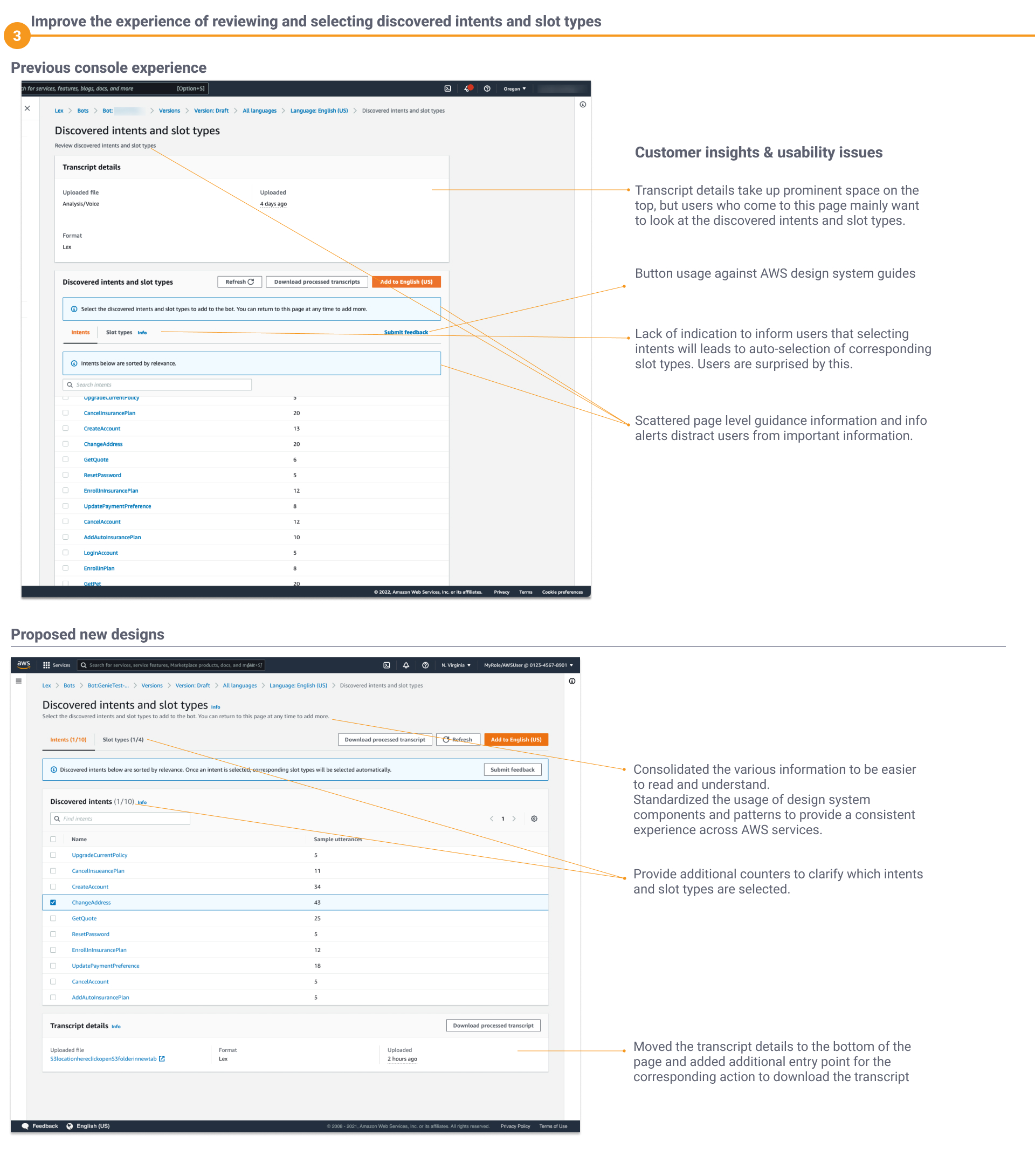
3 — Reviewing Discovered Intents & Slot Types
Transcript details took up prominent space at the top of the page, but users come to this page mainly to look at the discovered intents and slot types. There was no indicator that selecting intents auto-selects corresponding slot types — which surprised users — and scattered page-level guidance and info alerts distracted from important information.
- Moved transcript details to the bottom of the page, with an added entry point for downloading the transcript
- Consolidated the scattered guidance to be easier to read, and standardized design-system components for a consistent cross-AWS experience
- Added counters to clarify which intents and slot types are selected
4 — Evaluating Intent Quality
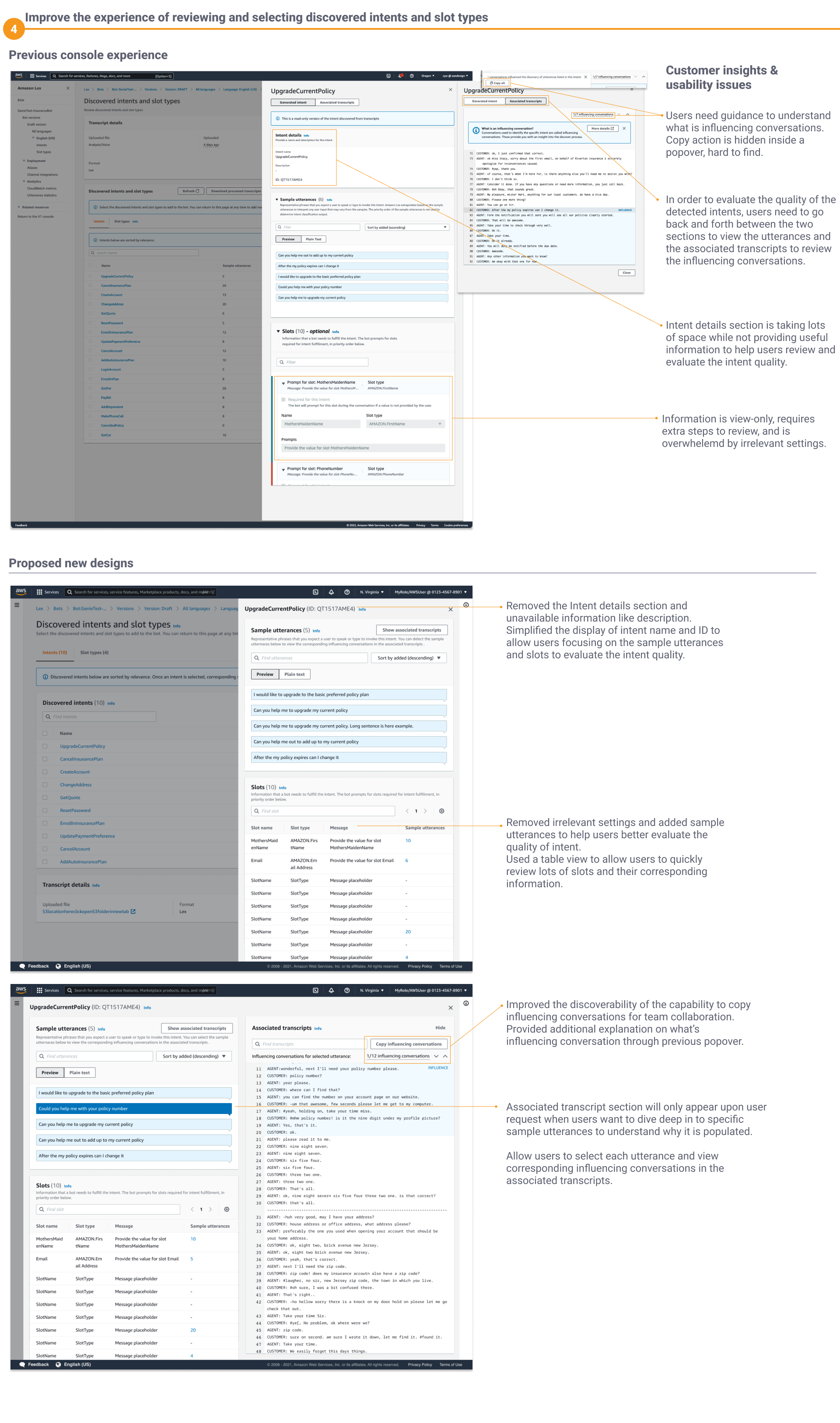
Evaluating a discovered intent means judging machine output. The sample utterances are the real phrases customers used — "I forgot my password and I'm trying to pay my bill online" — and the associated transcripts are the conversations that produced them: the evidence a designer needs to trust the intent or throw it out. But users had to jump back and forth between the two to review the influencing conversations, the copy action was hidden inside a popover, and a large intent-details section added little value — view-only information that took extra steps to review, crowded by irrelevant settings.
- Removed the intent-details section and simplified the display of intent name and ID, so users can focus on sample utterances and slots
- Removed irrelevant settings, added sample utterances, and used a table view so users can quickly review many slots and their corresponding information
- Associated transcripts now appear only on request, when users want to dive into why a specific utterance is populated — with each utterance selectable to view its influencing conversations
- Improved the discoverability of copying influencing conversations for team collaboration, with added explanation of what an influencing conversation is
What the designer takes away from all four steps is a starting point, not a finished bot — a set of intents and slot types to iterate on by adding prompts, merging overlapping intents, and renaming slots before building, testing and deploying. Every improvement above is aimed at the same thing: getting a designer to a bot design they trust, faster. Together, they're what took the feature out of preview.
Design Work Example 2 — Visual Builder
Accelerate conversation design: make it easy to design chatbots for low-code/no-code users. From February to September 2022 I was the UX lead for design and research on the Amazon Lex Visual Builder — working with a mid-level designer, one principal product manager with three PMs, and four senior engineering managers leading 100+ engineers and data scientists. I led the design and research activities, drove UX strategy and planning, built the collaboration mechanisms, and delivered hands-on design across features. The result — the Visual Conversation Builder — launched publicly in September 2022, at no additional cost, in every AWS Region where Amazon Lex V2 is available.
The Problem
Research with customers — interviews, foundational studies and feature requests — surfaced two consistent pain points for conversation designers. They were juggling many tools: spreadsheets for slots and prompts, plus a zoo of flow tools (Illustrator, XD, Sketch, Draw.io, Lucidchart, Visio, OmniGraffle) — time-consuming to manage and to communicate across stakeholders. And they depended on developers to implement and update every design just to test it, creating duplicate work on both sides to translate designs into bot definitions. With the enterprise conversational-AI market heating up, this was a business opportunity as much as a usability fix.
Understanding the Users
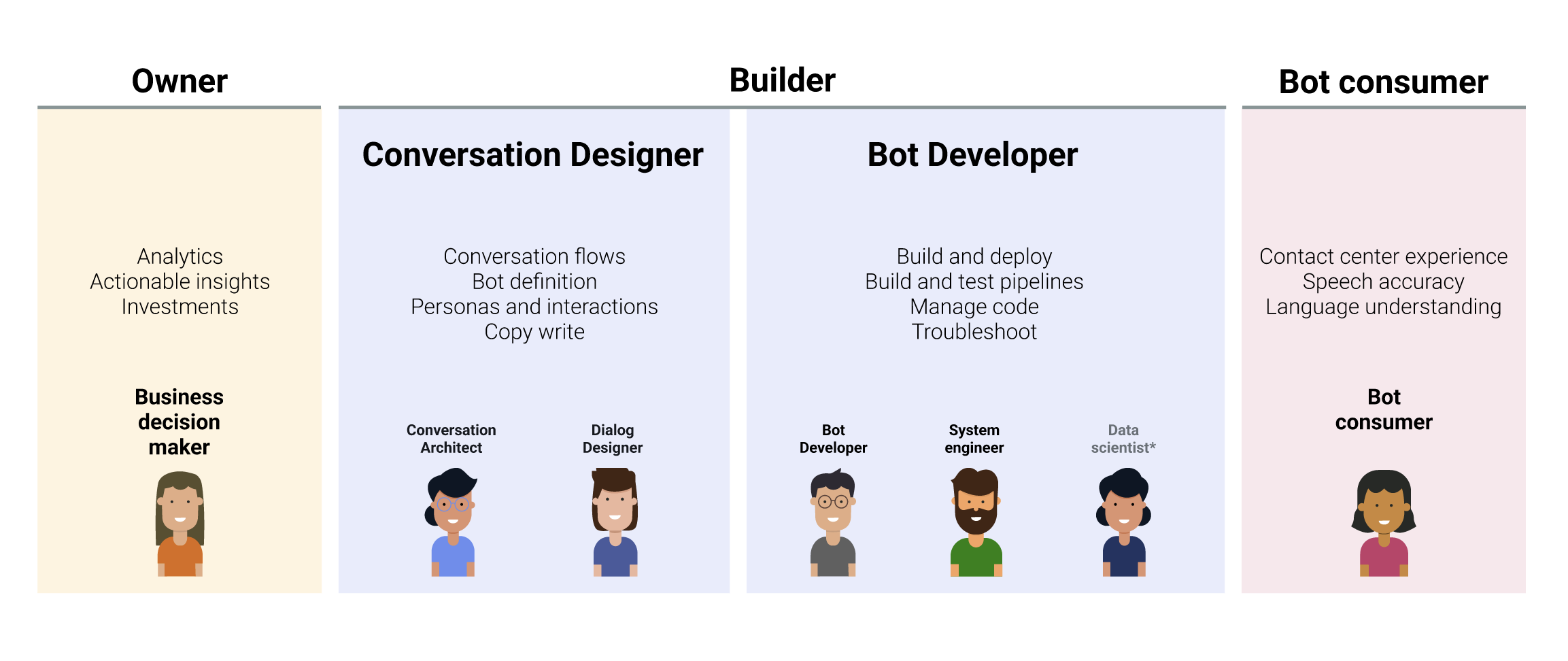
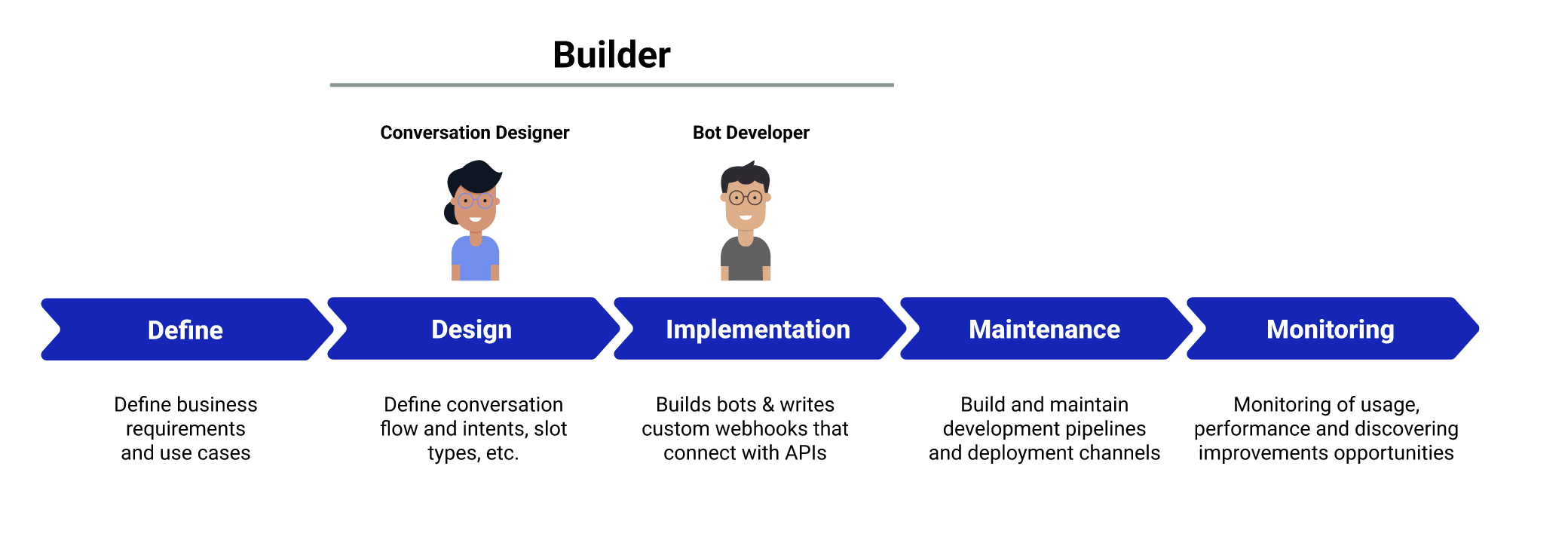
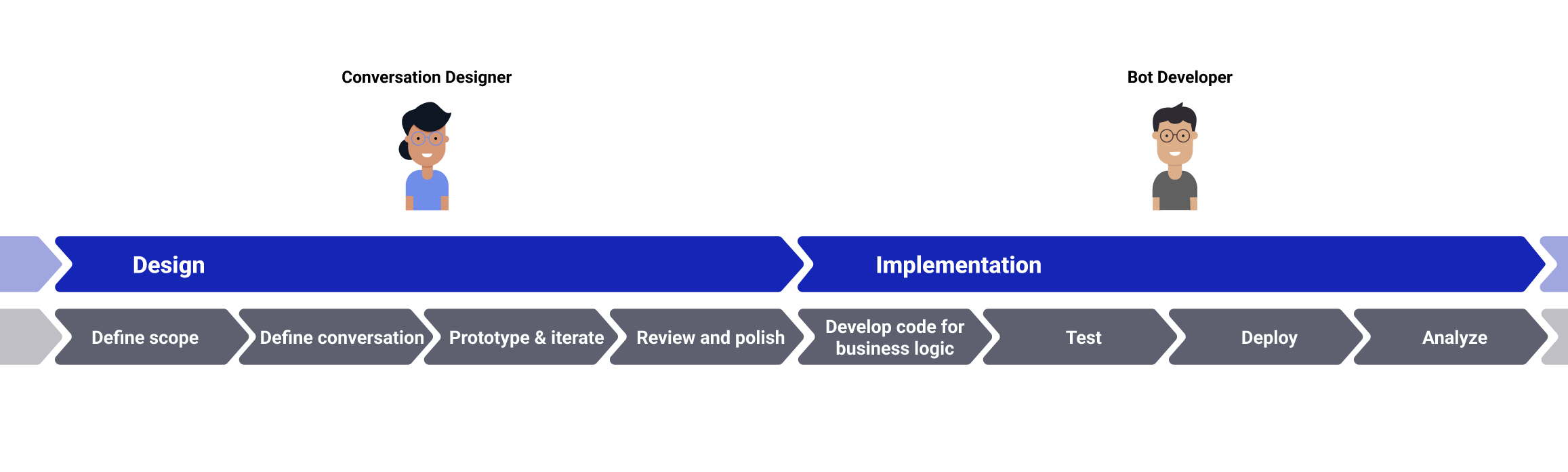
I mapped the ecosystem into three groups — the business owner, the builders, and the bot consumer — and zoomed into the builder journey: the conversation designer owns the design stage (define scope, define the conversation, prototype and iterate, review and polish) while the bot developer owns implementation (business logic, test, deploy, analyze). The Visual Builder had to serve the designer's half without breaking the developer's.
Goals, Constraints & Metrics
The goal was simple to state — make conversation flows easy to create for low-code/no-code users — under three hard constraints: backward and forward compatibility with existing bots, collaboration across features and teams, and a tight launch timeline. Success metrics were defined up front: usage (runtime and save requests, slot creation, builds, view switching, blocks per graph, time spent), performance (load time, errors in main tasks) and validation (auto-connections, active/inactive blocks).
Finding the Right Solution
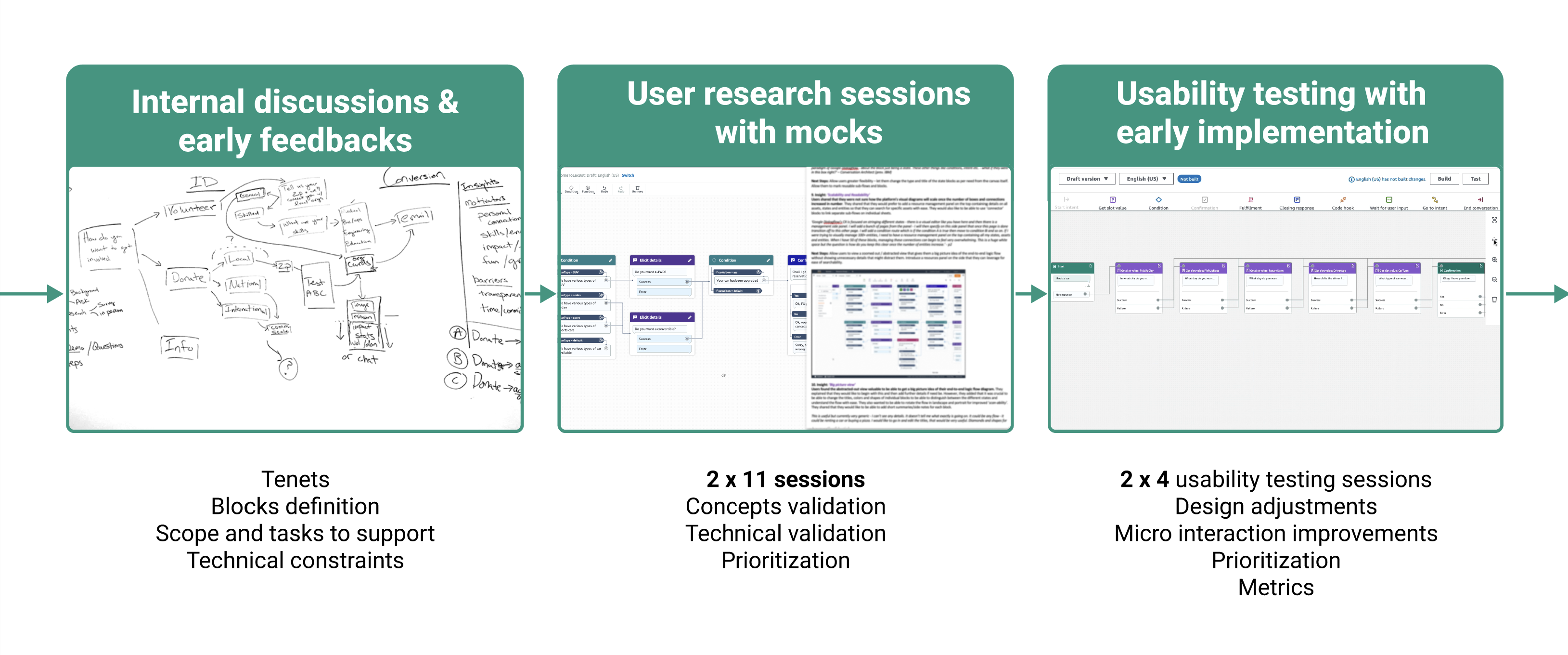
The design ran through three tightening loops: internal discussions and early feedback to set tenets, block definitions, scope and technical constraints; two rounds of eleven user research sessions with mocks for concept validation, technical validation and prioritization; then two rounds of four usability tests on the early implementation for design adjustments, micro-interaction improvements and metric definition.
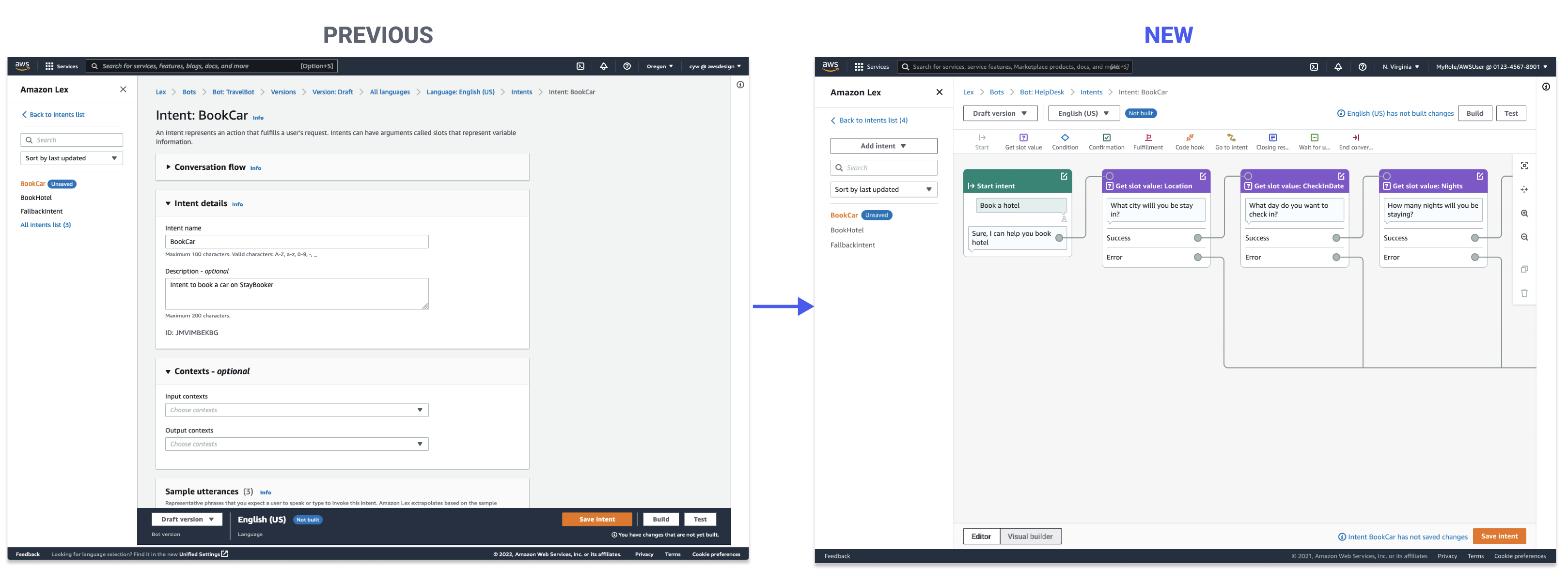
From Configuration Forms to a Conversation Canvas
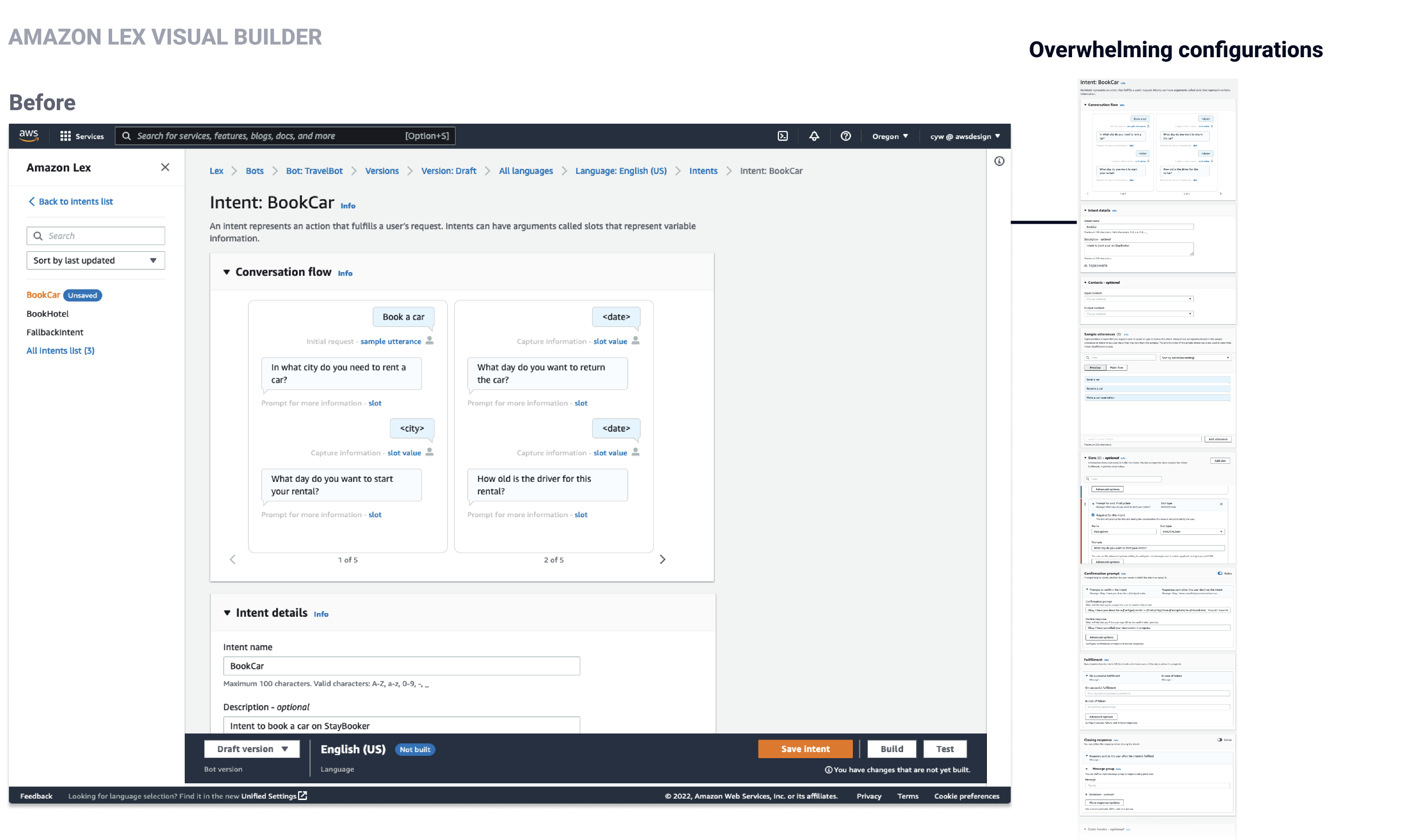
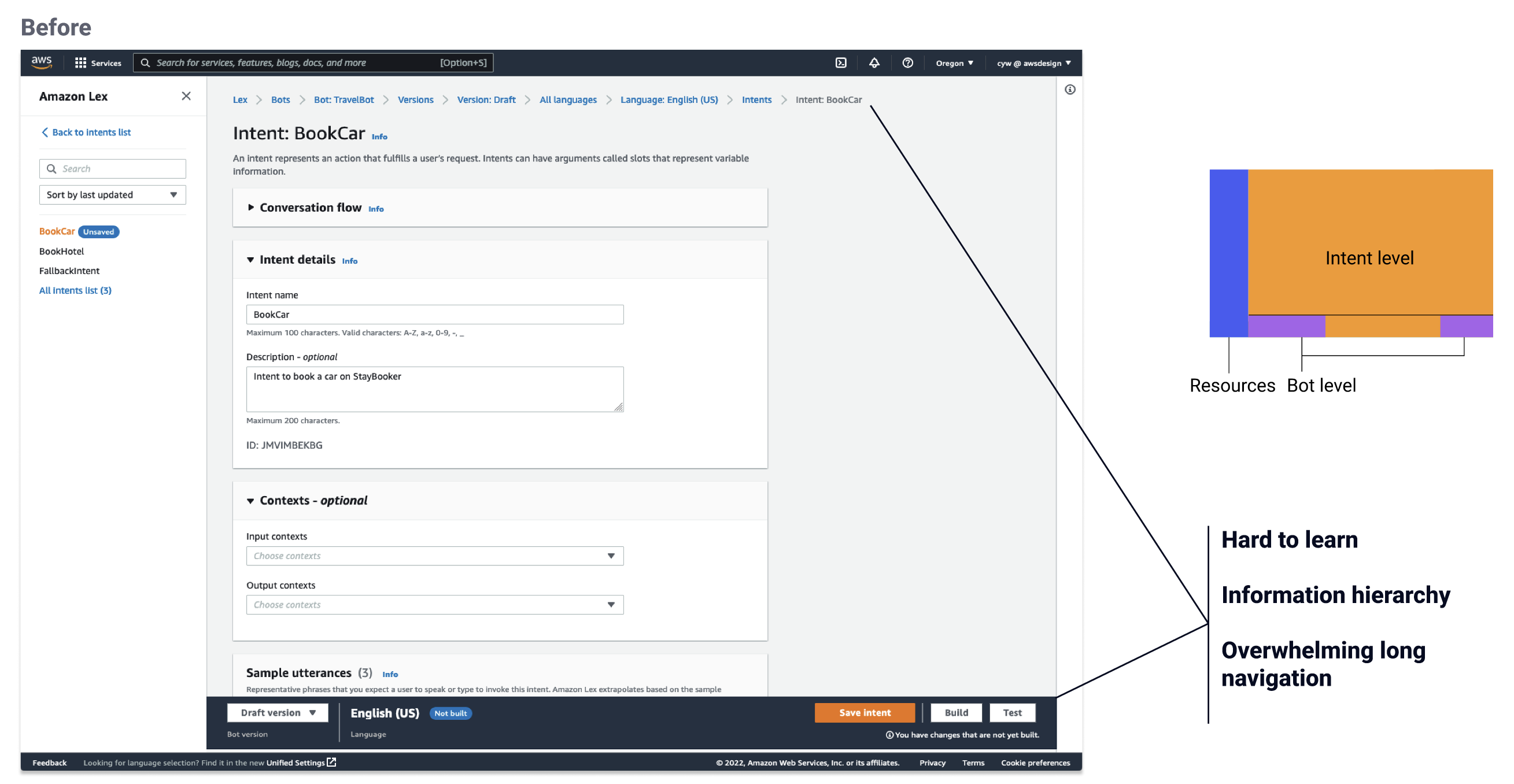
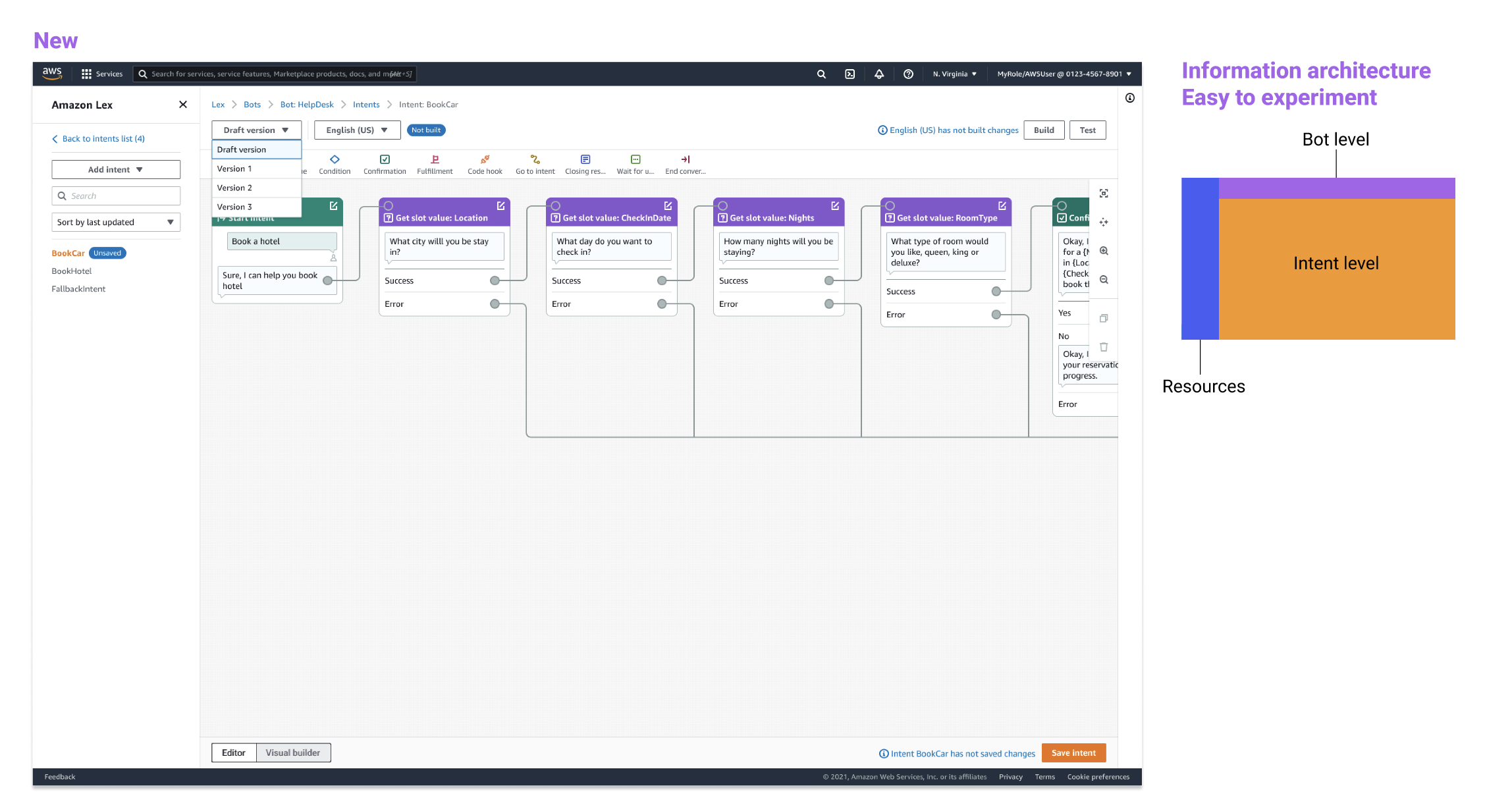
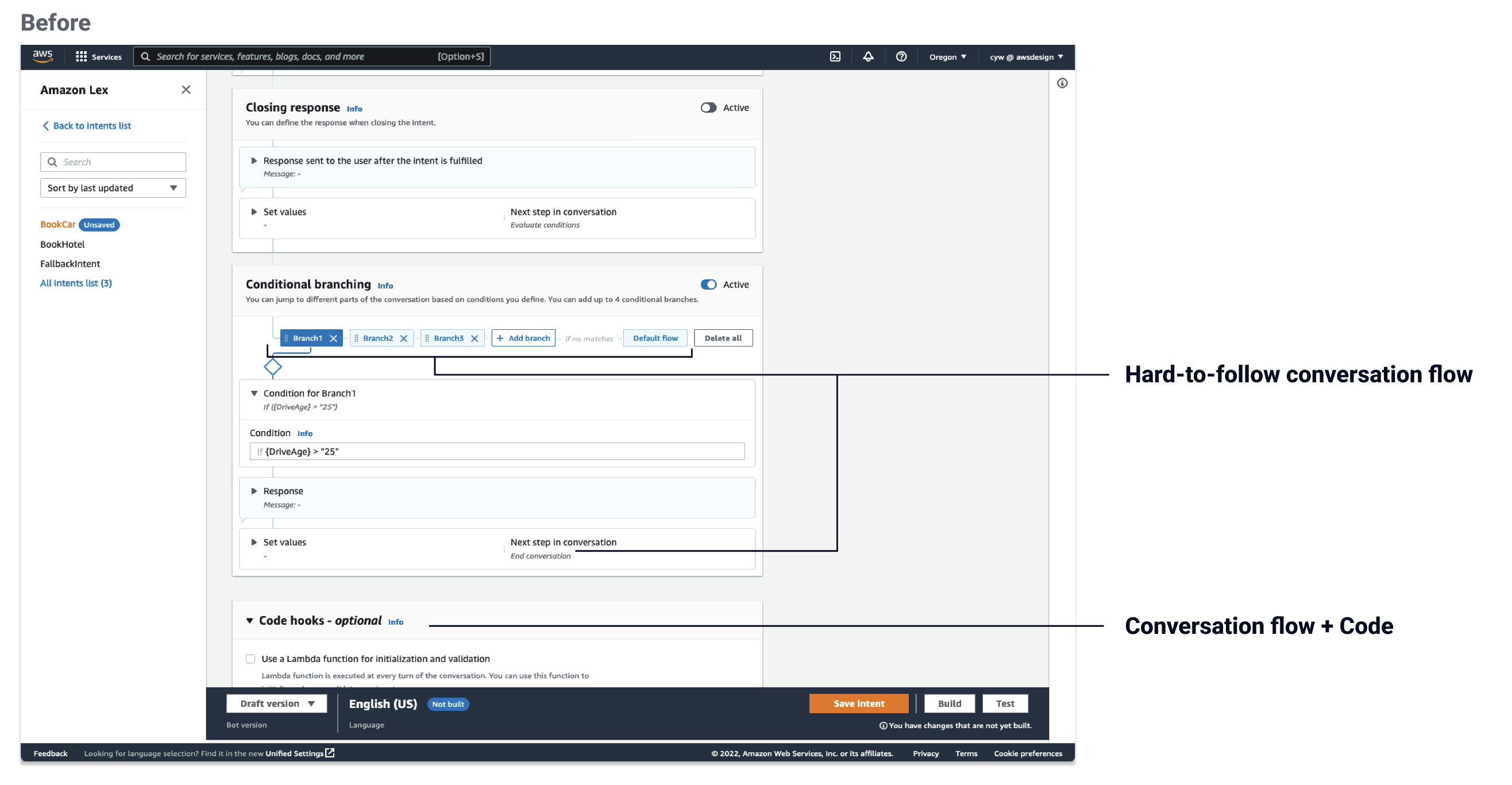
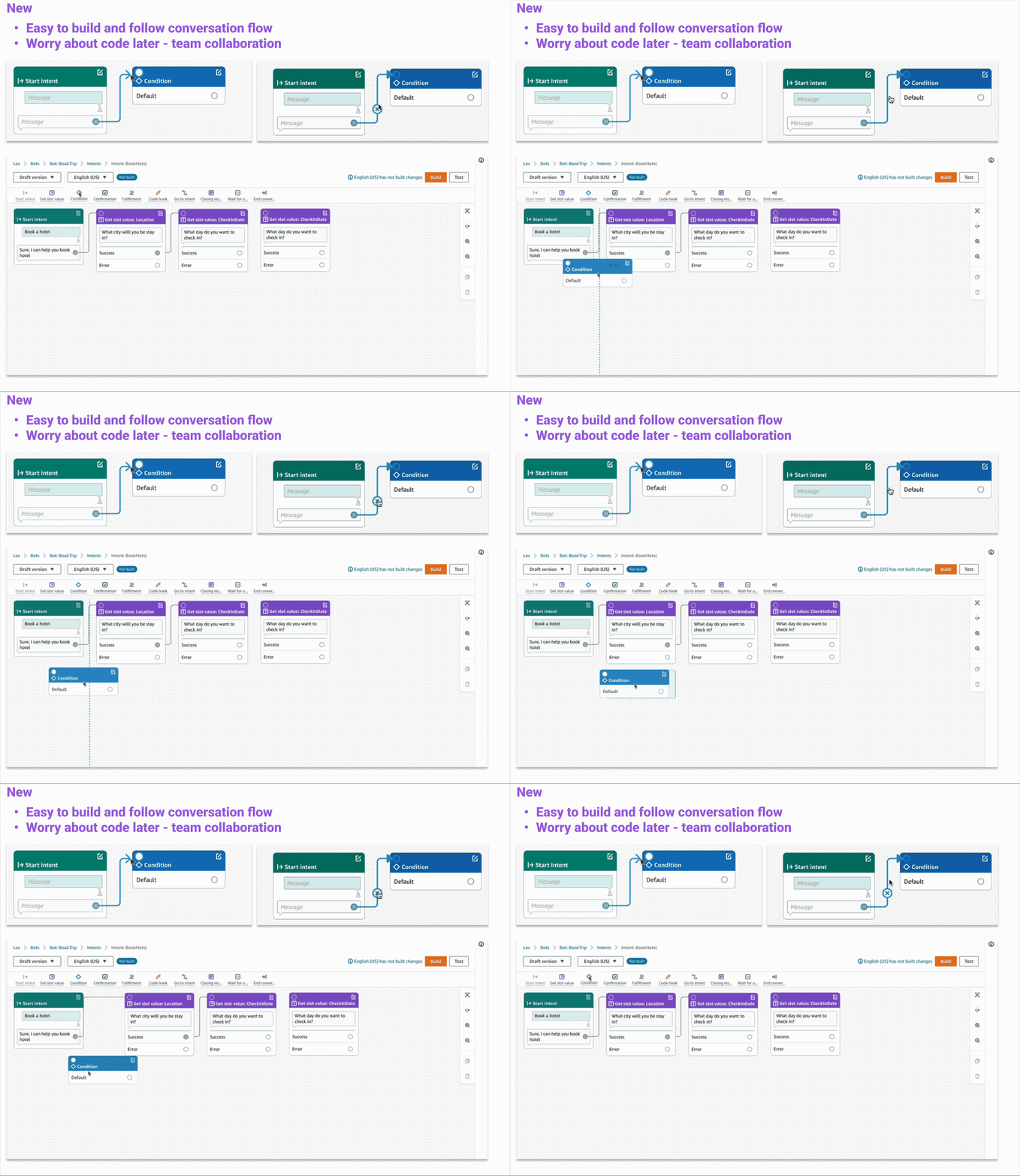
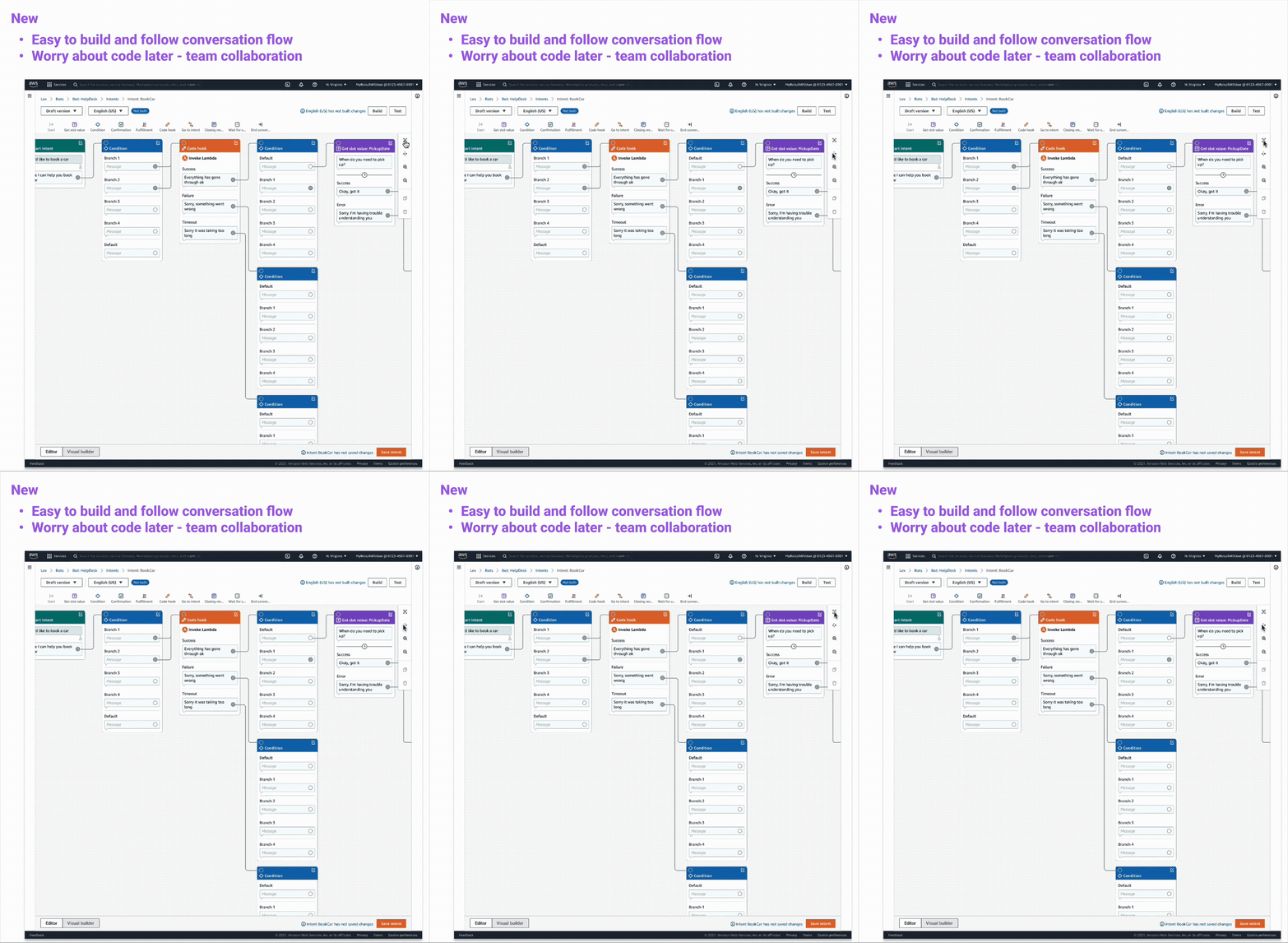
The existing editor buried conversations in overwhelming configuration forms — a hard-to-learn information hierarchy, long navigation, and conversation flow tangled together with code. The Visual Builder inverts that: a drag-and-drop canvas where the conversation flow is the primary surface, configurations appear in context, the information architecture (bot, intent, resource levels) is easy to experiment with, and code comes later — so designers can build and follow the flow, then hand off to engineers cleanly.
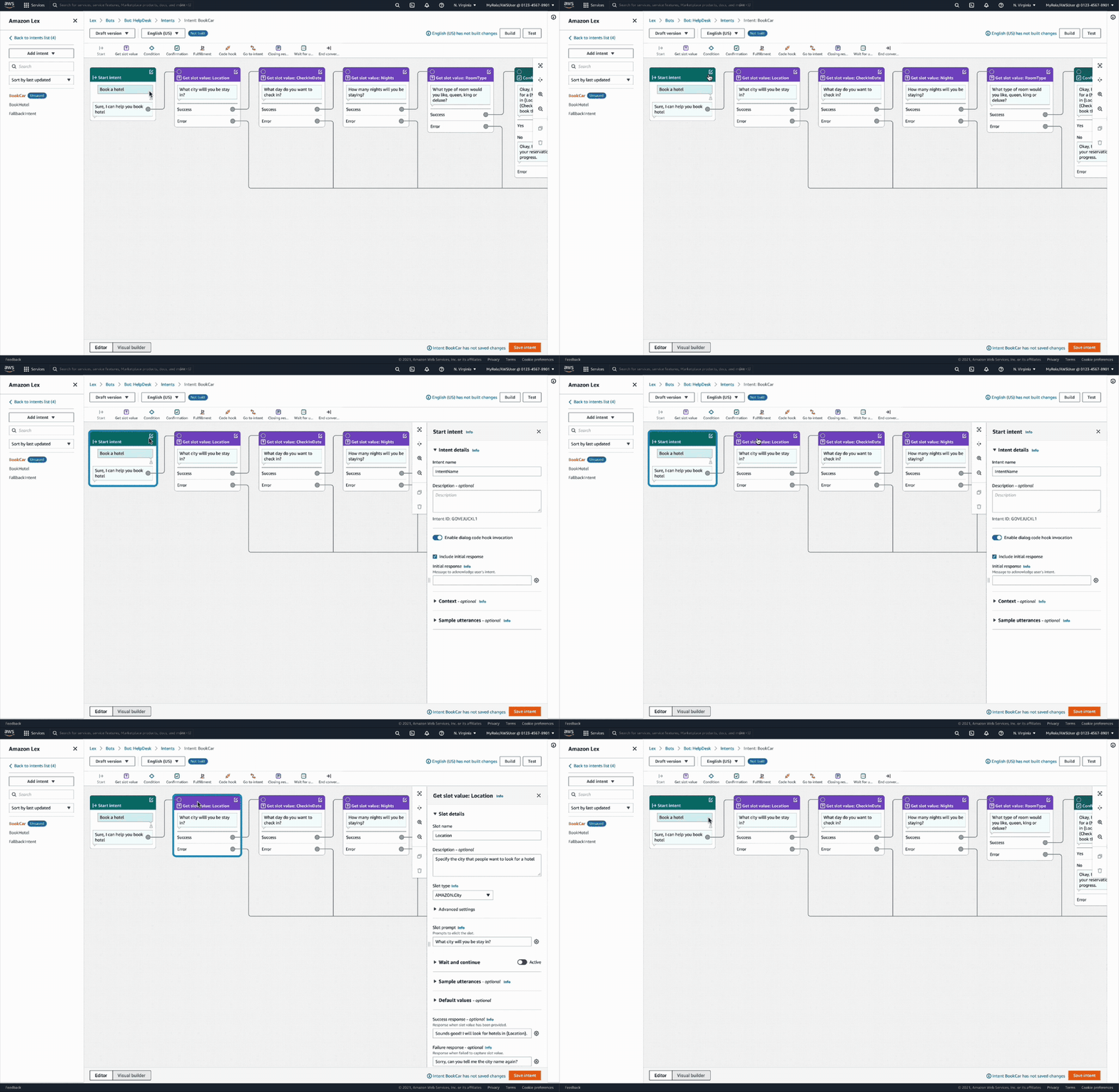
The canvas gives builders a single unified view of the whole conversation, assembled from nine block types — start, get slot value, condition, dialog code hook, confirmation, fulfillment, closing response, wait for user input, and end conversation. Conditional branching no longer requires a Lambda function, missing failure paths are detected and can be added automatically, and every change gives instant visual feedback on its dependencies. Designers can drop in placeholder code-hook blocks that default to the success path during testing — so a flow can be tried end to end before any business logic exists — and switch between the canvas and the traditional menu-based editor at any time, keeping designers and developers in the same tool.
Before 1: overwhelming configurations
After 1: Focusing on the conversation flow without worrying about configurations first. Conduct in-context configurations
Before 2: Confusing information architecture
After 2: Simplified information architecture
Before 3: Hard to follow conversation flow
After 3
Results
- 30% less time required to build a basic conversation flow
- 100+ accounts created or saved conversation flows with the Visual Builder in the first month; with conditional branching, 60+ accounts drove ~3K runtime requests in month one
- Users told us it made creating flows — and handing them over to engineers — much easier; AWS partner NeuraFlash publicly called the drag-and-drop flow "a game-changer for reinventing the contact center experience"
- Beyond the launch: a usability tracker with a clarified improvement process (16 of 62 items addressed in the launch quarter), an internal user and expert interview panel, 12 engineers and managers shadowing customer research within two weeks, and product-leader support to adopt analytics tagging for quantitative data in upcoming launches